
This year "works with Claude Code" turned up on design tool homepage after homepage. Most of them now give Claude Code, Cursor or Codex a way in, usually an MCP server (MCP is the Model Context Protocol, the standard way agents plug into other apps).
Here's the catch. The same phrase covers three very different jobs. In some tools the agent reads your designs. In others it makes them. In one, it edits your running app. Pick the wrong kind and you'll spend a week wondering why your agent "can't design".
Full disclosure: we make one of these, Floo. We've tried hard to be fair to the other nine, and we say where we'd pick them over us. Everything about them comes from their own sites and docs, checked in November 2026. We haven't run a lab-style bake-off, so there's a test at the end you can run yourself.
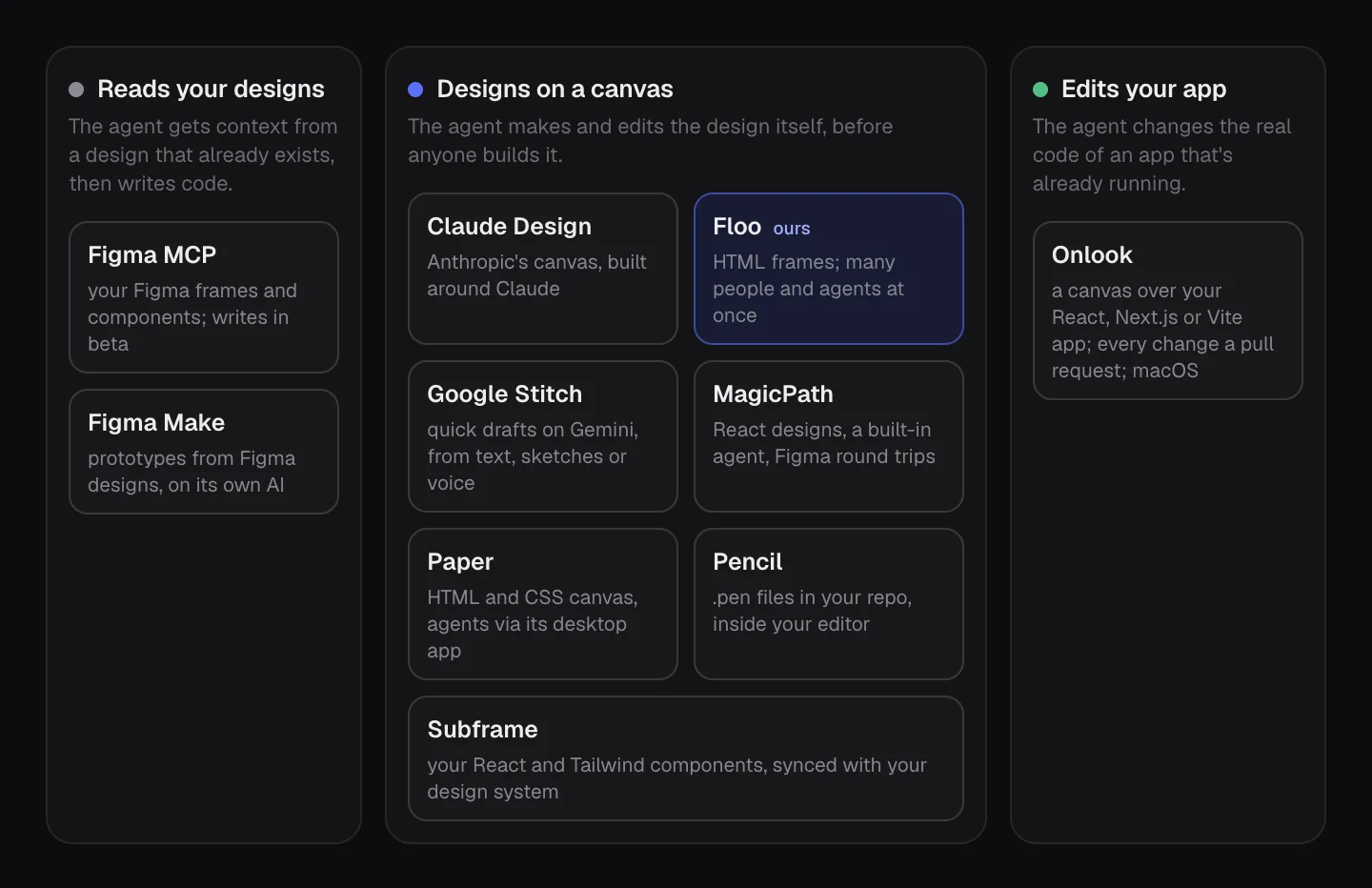
Four questions that sort them
- Does the agent design, or only read? Some MCP servers hand agents design context so they can write code from an existing file. Others let the agent create and edit the design itself.
- What is a design made of? Vector layers, a tool's own file format, React components or plain HTML. Agents write HTML and React all day. The closer the design is to code, the less gets lost when it becomes code.
- Where does the agent plug in? A remote server with OAuth works from any machine, and from cloud clients like claude.ai and ChatGPT. A local server only works where its desktop app or editor runs.
- Who else is in the room? Some tools are built for one person and one agent. Others put a whole team, and several agents, on the same designs.
The agent reads your designs
Figma (MCP server)
If your design system lives in Figma, this is where you start. Figma's MCP server hands coding agents your frames and components to build from. Since March 2026 agents can write to the canvas too, but that tool is still in beta, so day to day the agent mostly reads.
Pick it if your designers and components already live in Figma. Watch out: reading is the core. Canvas writes are still in beta, so the agent mostly works from designs people made. figma.com · Floo vs Figma MCP
Figma Make
Figma's prompt-to-app tool. It turns prompts and Figma designs into clickable prototypes and small web apps you can publish, using its own AI with a choice of models.
Pick it if you're a Figma team that wants a working prototype from your designs, fast. Watch out: Claude Code and Cursor see Make files as context through Figma's MCP server. They don't edit them. Make also runs on monthly AI credits per seat. figma.com/make · Floo vs Figma Make
The agent designs on a canvas
Claude Design
Anthropic's own design canvas, launched in April 2026. It's built around Claude and has its own MCP server.
Pick it if your team works in Claude and wants the design tool from the model's maker. Watch out: it's built around one provider's models. claude.com/design · Floo vs Claude Design
Floo (ours)
A multiplayer canvas where every frame is a complete HTML document. Floo is one remote MCP server with OAuth. Claude Code, Cursor, Codex, Claude, ChatGPT, GitHub Copilot, Windsurf and Gemini CLI can all work on the same canvas, next to the people on your team, each with its own cursor and task. Agents can study real app screens before they design, work through comments and follow the canvas's style guides.
Pick it if several people and agents design together, and you want the design to already be the HTML that ships. Watch out: Floo doesn't import Figma files, and it doesn't design on its own. The agents you connect do the designing, and the free plan holds two canvases at a time. How it works with Claude Code
Google Stitch
A Google Labs experiment that turns text, sketches, screenshots and even your voice into UI designs and front-end code, on Google's Gemini models. Since March 2026 it has a canvas with a design agent, a remote MCP server, an SDK and official skills for coding agents, Claude Code and Cursor included.
Pick it if you want fast first drafts, or you build with Google AI Studio or Antigravity. Watch out: it's labelled an experiment with no price listed, and its MCP server needs a Stitch API key or a Google Cloud project. stitch.google.com · Floo vs Google Stitch
MagicPath
A shared canvas where people and AI agents design together. It has its own designer agent with a model picker, a remote MCP server with OAuth, plugins for the main coding agents and ChatGPT, and designs that copy to and from Figma.
Pick it if you want a built-in agent and easy round trips with Figma. Watch out: every design is React code. Great for React teams, less so for everyone else. magicpath.ai · Floo vs MagicPath
Paper
A design tool whose canvas is built on real HTML and CSS. Claude Code and Cursor work on it over MCP, through the Paper Desktop app.
Pick it if your designers want a designer-first editor and your agents run on the same machine. Watch out: the agent has to run where the desktop app runs. paper.design · Floo vs Paper
Pencil (pen.dev)
An agentic design canvas inside your editor. Designs are .pen files in your repository, reached through a local MCP server. (pencil.dev now redirects to pen.dev.)
Pick it if you're designing your own product and want design files versioned in git, right next to the code. Watch out: reviewers need the repository and an editor to see anything. pen.dev · Floo vs Pencil
Subframe
A design tool for your codebase: a desktop app, with a web version, that puts a canvas, an agent and a browser in one window. Designs are React and Tailwind components synced with your design system, and its remote MCP server with OAuth is documented for the main coding agents.
Pick it if you're a React team that wants to design with your real components. Watch out: it's built around React, and designing over MCP needs an editor seat. subframe.com · Floo vs Subframe
The agent edits your running app
Onlook
A free, open-source Mac app, relaunched as Onlook 2.0 in November 2026. It lays a canvas over your running React, Next.js or Vite app. Your own Claude Code or Codex edits the real code, and every change becomes a pull request.
Pick it if you want to change an existing app visually, in its actual code. Watch out: it runs on macOS only, and Onlook says Windows is on the way. Its site doesn't describe multiplayer editing or comments, and a team product is planned. onlook.com · Floo vs Onlook
Pick in ten seconds
| If you… | Look at |
|---|---|
| live in Figma and need agents to read your designs | Figma MCP |
| want a working prototype from your Figma designs | Figma Make |
| work only in Claude | Claude Design |
| want people and several agents designing in HTML together | Floo |
| want quick drafts from a prompt, a sketch or your voice | Google Stitch |
| want a built-in designer agent and round trips with Figma | MagicPath |
| want a designer-first HTML editor on your machine | Paper |
| want design files in git, inside the editor | Pencil |
| want to design with your real React components | Subframe |
| want to edit an existing app visually, in its code | Onlook |
Run this test before you commit
Reviews (this one included) can't tell you how a tool feels on your product. An afternoon can.
Take one real screen your team needs this month. Give the same brief to the agent you actually use, in two or three of these tools. Then show the results to the people who'd review the design anyway, and score three things.
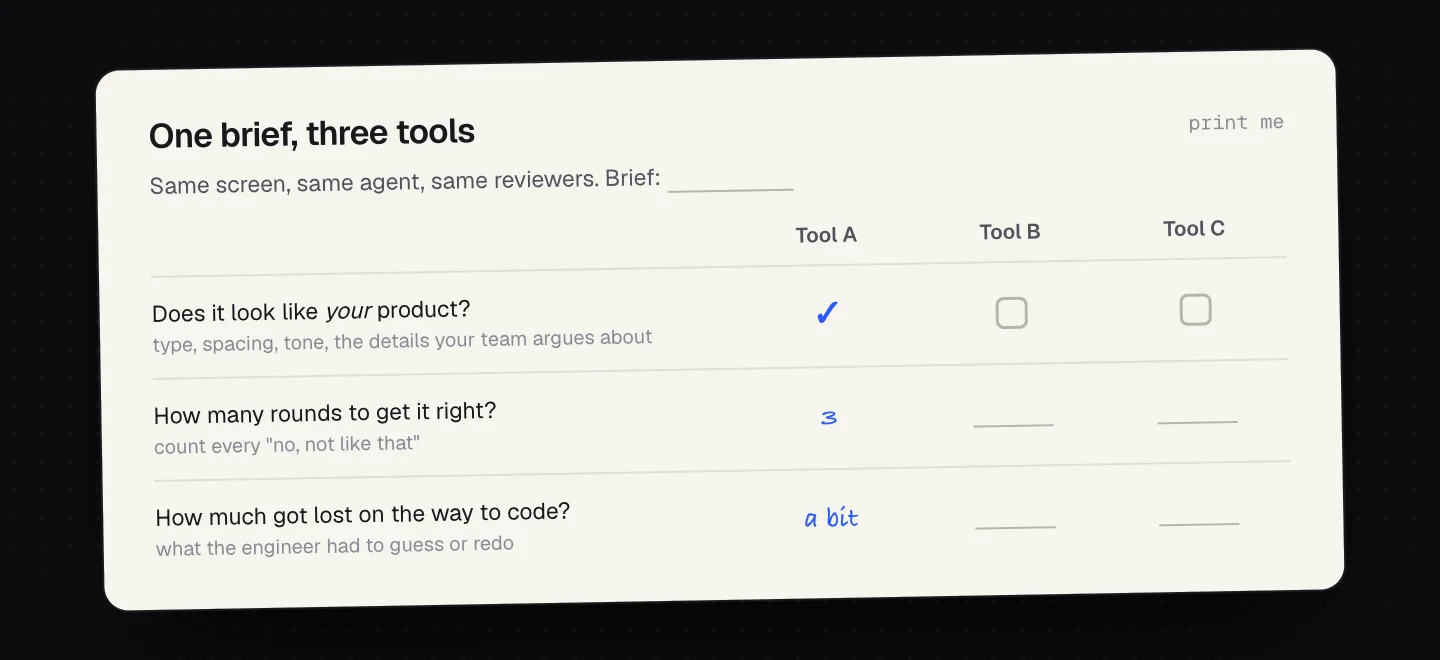
Does the result look like your product, or like everyone's? How many rounds of "no, not like that" did it take? And how much did the engineer have to guess when it became code? The third question is the one people forget, and it's usually where the week goes.
If Floo makes your shortlist, the free plan includes two canvases and any agent over MCP. Connect Claude Code in a minute, or pick another agent.