
"Give the agent eyes" is popular advice: let Claude Code screenshot what it builds, and it'll catch its own layout bugs. We wanted to know how much that actually buys you, so we used a real bug instead of a made-up one.
In our model comparison, Haiku's bare-prompt page came out with a broken first screen. The headline started 636 pixels down, under a slab of empty space, and the main "Start free" button ended at 1,061 pixels, below the bottom of a 1440 × 900 window. Nobody would ship that.
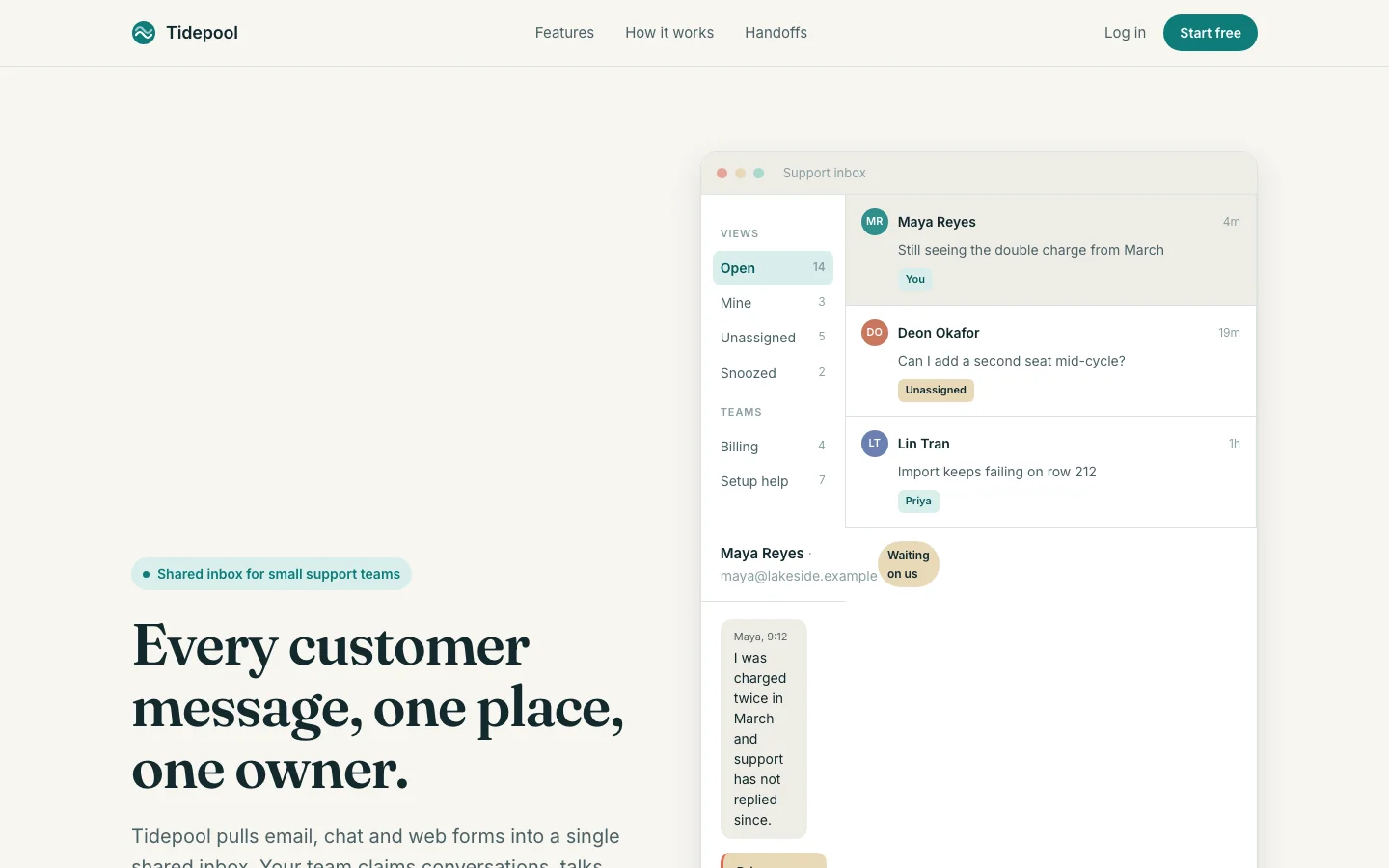
The setup
We gave four fresh Claude Code agents the same instruction: "This landing page was designed for a 1440 × 900 desktop browser window. Review its layout and fix any layout problems you find, especially in the first screen. Keep the design, copy and colours otherwise the same."
- Code only: the agent was told not to render, screenshot or open the page.
- With screenshots: the agent got one command that renders the page at 1440 × 900 and saves a first-screen and a full-page screenshot, and was asked to look before changing anything and again afterwards.
We ran both on Haiku 5.5 and Sonnet 5.5. Same file, one shot each.
Reading the code found the bug every time
All four agents found the same root cause, and all four fixed it. The inbox mock-up had three panels (folders, conversation list, thread) but its grid only had two columns, so the thread wrapped into a second row inside the narrowest column and dragged the whole hero down. Every agent changed the grid to three columns and rebalanced the hero.
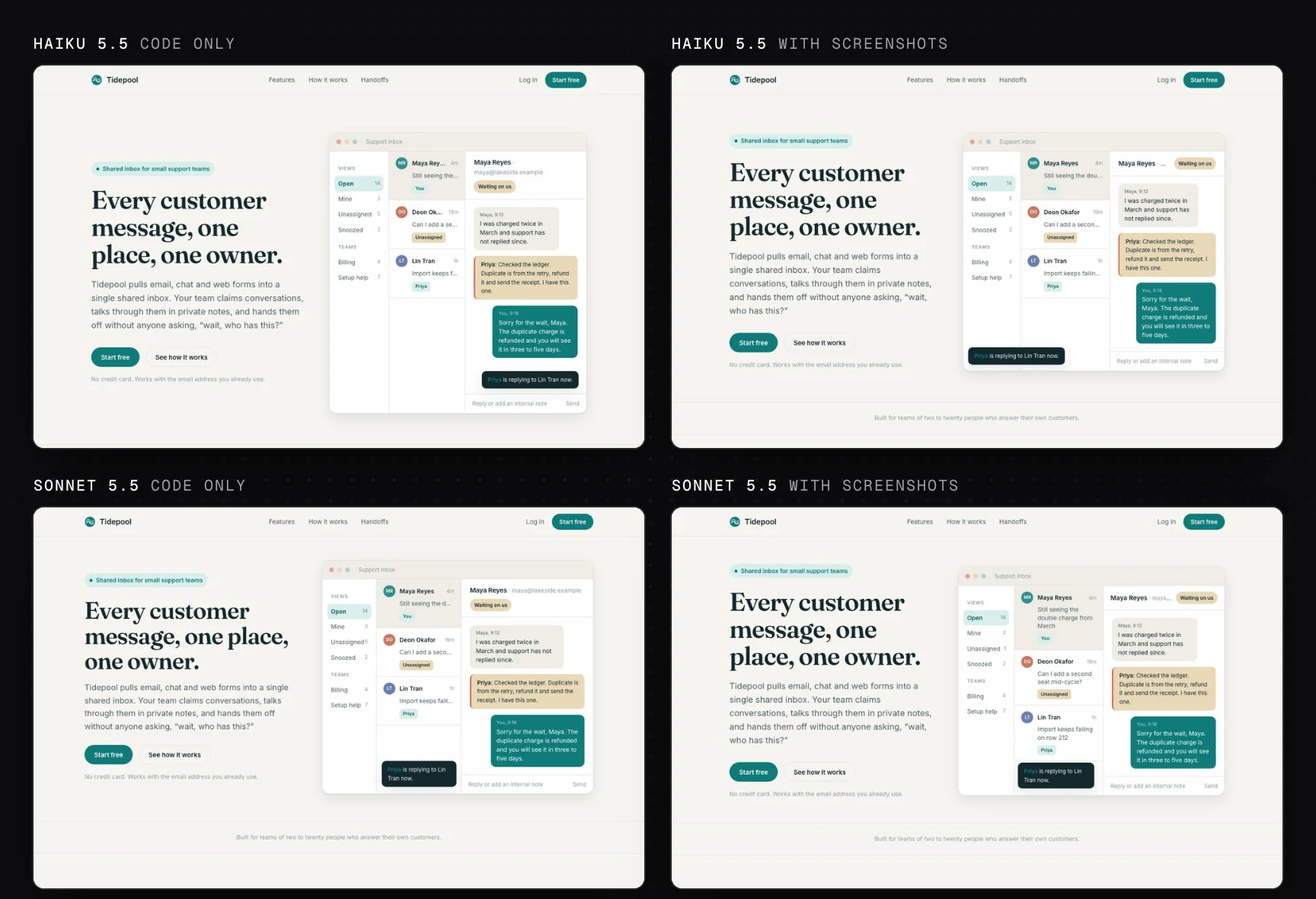
Measured in the same browser, the main button went from 1,061 pixels down to between 607 and 709 pixels, well inside the first screen, in every run. The code-only runs were no slower. Sonnet working blind was the fastest of the four, at 32 seconds.
| Button ends at | Headline starts at | Time | Tool calls | |
|---|---|---|---|---|
| Broken page | 1,061 px | 636 px | ||
| Haiku, code only | 709 px | 284 px | 54 s | 7 |
| Haiku, with screenshots | 675 px | 219 px | 56 s | 15 |
| Sonnet, code only | 607 px | 213 px | 32 s | 2 |
| Sonnet, with screenshots | 648 px | 191 px | 54 s | 9 |
So for a structural bug, the kind you can find by reading the CSS, eyes didn't matter. The code said "three panels, two columns", and every agent could read that.
Screenshots caught what only shows when it renders
The difference was in the details nobody asked about.
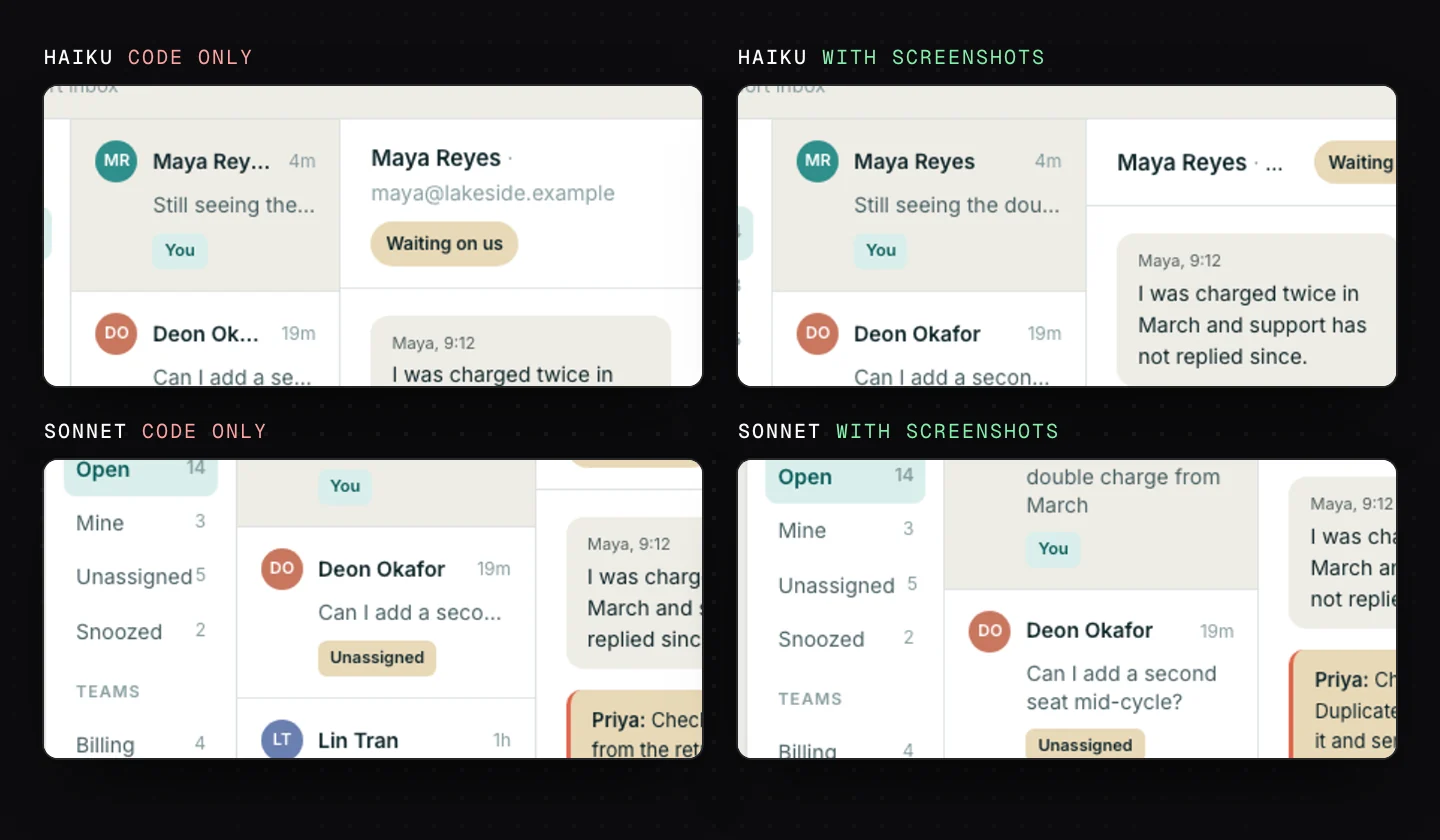
- Haiku working blind left the conversation list so narrow that names got cut off: "Maya Rey…", "Deon Ok…". Haiku with screenshots shows "Maya Reyes" and "Deon Okafor" in full.
- Sonnet working blind left "Unassigned" touching its count: "Unassigned5". Sonnet with screenshots has the gap, and it also noticed that a "Waiting on us" pill overflowed and that message previews were being cut off, and fixed both.
None of these show up in the code as an error. They only exist once text meets a real width in a real font. You find them by looking, which is what the screenshot runs did: Haiku took 15 tool calls to the blind run's 7, rendering the page and checking it as it went.
What we'd take from this
- Don't skip the code review. For layout bugs with a structural cause, reading the markup is fast and reliable. The cheapest model working blind fixed the real bug in under a minute.
- Do give it eyes for the last mile. Truncated text, collisions and overflow are where a page starts to look careless, and they're invisible in the source. A screenshot step costs a few seconds per look.
- Ask it to look again after its changes. A layout fix moves things around, and the moved things are where new small problems hide. Both screenshot runs were told to check their own work, and both came out clean.
This is also why every Floo canvas gives agents a screenshot tool, and why our MCP server tells them to use it: "Look at every change with get_frame_screenshot before moving on." On Floo the agent sees the frame it just changed, and so does everyone else on the canvas.
What this doesn't tell you
One bug, four runs. A bug that's purely visual, like a colour clash, an awkward line break or a crowded header, would probably separate the two conditions more, and a bug buried in a big codebase would make "just read the code" harder. We'd like to run both next.
See the pages
- The broken page
- Haiku: code only, with screenshots
- Sonnet: code only, with screenshots