
DESIGN.md is having a moment: a structured file with tokens and rules that tells coding agents what your product should look like. The obvious question is whether the format itself does anything. Would the same decisions, written as an ordinary paragraph in the prompt, work just as well?
We could test that directly. Our landing page template is the designer's brief from our first experiment, rewritten as a DESIGN.md. So we ran it on Haiku 5.5, Sonnet 5.5 and Fable 5.2 and compared each page with the one the same model built from the prose brief in our model comparison. Same task, same decisions, two formats, six pages.
Both formats were followed, completely
We checked every page against nine rules both versions spell out: Fraunces for the headline, IBM Plex Sans for body copy, Plex Mono for labels, the fog-paper background, harbour-ink headlines, the orange accent on the main button, a left-aligned hero, no purple or blue gradients, and no testimonials.
All six pages passed all nine. Every model, both formats. (The prose brief also named the prices, $12 and $24 a seat, and all three prose pages used them. The DESIGN.md doesn't mention prices, so those pages picked their own.)
| Prose brief | DESIGN.md | |
|---|---|---|
| Rules followed (9 shared) | 9, 9, 9 | 9, 9, 9 |
| Distinct colours (Haiku, Sonnet, Fable) | 5, 6, 9 | 5, 7, 7 |
| Page length (Haiku, Sonnet, Fable) | 4,446, 4,281, 4,092 px | 4,573, 3,924, 3,448 px |
| Product cropped at the right edge | 0 of 3 | 3 of 3 |
| Page scrolls sideways | 0 of 3 | 2 of 3 |
| Someone called Priya | 2 of 3 | 3 of 3 |
The format didn't make Claude more obedient. It was already obedient. The decisions did the work.
It reads the small print literally
There was one difference, and it came from a single line. The DESIGN.md's layout section says the product should sit on the right, "slightly cropped by the viewport edge". The prose brief never mentioned cropping.
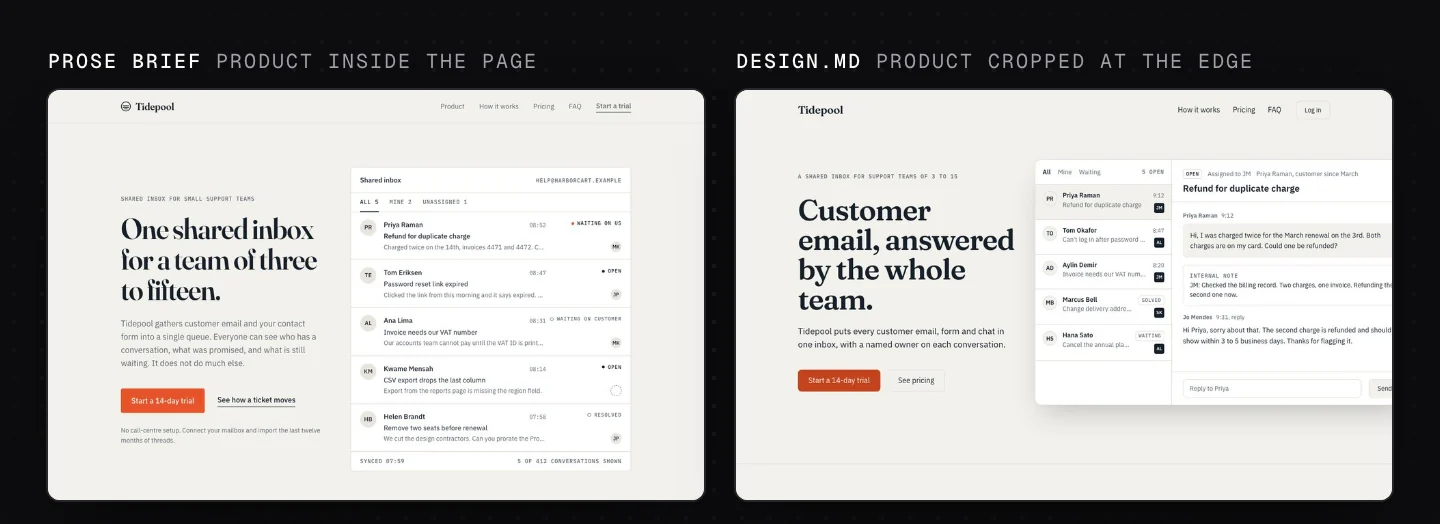
All three DESIGN.md pages cropped the product at the edge. None of the prose pages did. And two of the three (Sonnet and Fable) did it by pushing the product past the page, so the whole page now scrolls sideways, which is a bug on any laptop trackpad. Haiku clipped it cleanly.
That one is on us. The rule said what we wanted to see and not how to get it safely, and the models executed it as written. We've fixed the template: it now says to clip the product inside its section and that the page must never scroll sideways.
The lesson generalises. An agent treats every line in a DESIGN.md as an instruction to carry out, not a suggestion to weigh. Write each rule as if it will be followed literally, because it will be, and look at the rendered page to catch the ones that went wrong.
So what is DESIGN.md actually for?
Not better obedience. What it buys you is everything around the prompt:
- It sticks around. A prompt lasts one session. A file in the repo applies to every session, every teammate and every agent that reads it.
- It can be checked. Google's linter caught three contrast failures in our templates before any agent ever read them, including the white-on-orange button this brief started with.
- Its tokens travel. The YAML front matter converts to Tailwind themes and design tokens, so the file and your code can agree.
A prose brief is faster to write for a one-off. The moment the same decisions need to hold for a second session, put them in a DESIGN.md, and write the Overview paragraph with as much care as the hex codes.
What this doesn't tell you
Three models, one brief, one run each, and the two formats differ slightly (the DESIGN.md darkens the orange for contrast and omits prices). A longer, messier DESIGN.md, or a codebase that already has its own styles, might separate the formats more. What it does show is that a well-written set of decisions gets followed either way.
The pages
- DESIGN.md: Haiku, Sonnet, Fable, and the file exactly as tested
- Prose brief: Haiku, Sonnet, Fable
- The fixed template: landing-page.md