
Ask Claude Code for a settings page and you'll have one in moments. It compiles. It uses your components. And it looks like every other AI-made screen on the internet: a centred title, a sparkle emoji, a grid of rounded cards and a gradient button that says Save Changes. (That's the left one up there.)
The model isn't the problem. The setup is. We ask it to design and build in one go, alone, in a terminal, where nobody sees the result until it's already code. No human team works like that, so why make your agent?
Here are six steps that fix it, from a file you can write in ten minutes to a review anyone you share the canvas with can do in a browser. We make Floo, the canvas in steps 3 and 5. The other four steps work whatever tools you use.
1. Write your taste down
Claude Code reads CLAUDE.md at the start of every session. Put a DESIGN.md next to it and point to it from CLAUDE.md. Now every session starts from your rules instead of the internet's average.
The trick is to write rules you could check with a ruler. Adjectives don't count:
# Design rules

- Type: Inter 15/24 for body, 13/20 for meta. Headings 600 weight, -0.02em tracking.
- Colour: neutral greys; one accent (#2B59FF) only for the primary action.
- Layout: left-aligned, 8px grid, max content width 720px. No centred hero text.
- Components: buttons are 36px tall, 8px radius. No gradients, no drop shadows on cards.
- Density: tables over cards for lists of more than five items.
- Copy: sentence case, no exclamation marks, verbs on buttons ("Save changes").
"Make it modern" gives the model nothing to hold on to. "No centred hero text" does. If you catch yourself writing "clean", delete it and write down what clean means to you.
2. Show it real references
Designers almost never start from a blank page. They look at how the best products solved the same screen. Give Claude Code the same head start: two or three screenshots of apps that nail the problem, each with one line on what to take from it.
Design our checkout like these two: take the single clear total from the first and the payment-method list from the second. Keep our type and colours.
One good reference steers the model more than a paragraph of description. In Floo, agents can search a library of real iOS and web app screens and flows themselves (search_catalog_screens, get_catalog_flow) and put the useful ones on the canvas before they start.
3. Give it a canvas, not just a repo
This is the step most people skip, and it's the one that changes the most. When Claude Code designs straight into your repo, looking at one screen means reading a diff, running the app and clicking through to it. Trying three directions means three branches. So nobody tries three directions.
Connect it to a design canvas over MCP (the Model Context Protocol) and it designs before it builds. With Floo that's one command:
claude mcp add --transport http --scope user floo https://worker.floo.design/mcp
Then type /mcp in Claude Code, pick floo, choose Authenticate and approve in the browser. The full setup also covers sharing the server with a whole repository through .mcp.json.
Now ask for options, plural:
Work on Floo canvas cnv_8hQ2x. Start with get_guide and follow it. Design three directions for the pricing page side by side, following DESIGN.md.
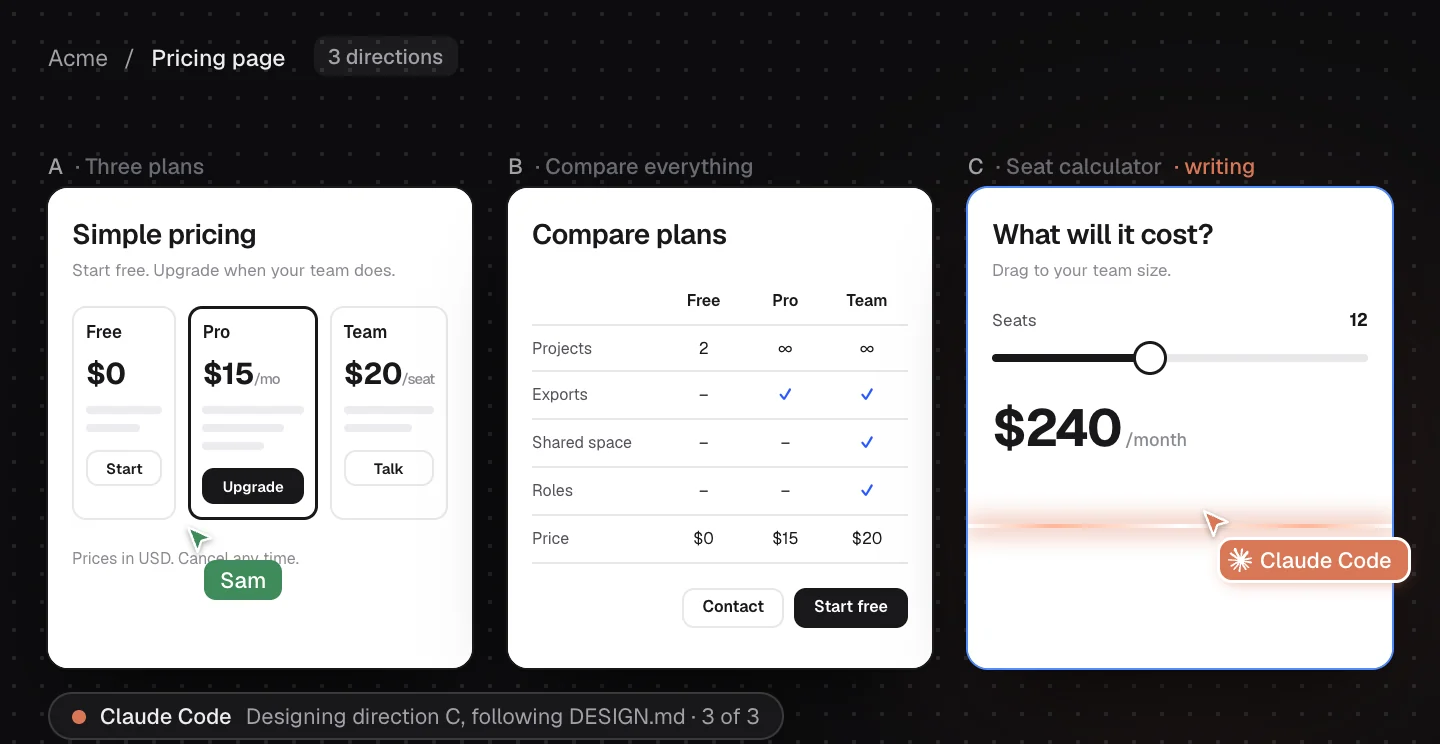
Each frame is a real HTML document, rendered live. Claude Code can also screenshot its own frame (get_frame_screenshot) to check spacing and alignment before it calls the work done.
4. Design the states nobody asks for
The happy path is the easy part. Real people run into everything else:
- the empty state (no data yet), the loading state and the error state;
- long names, big numbers and translated copy that runs 30 percent longer;
- the phone width next to the desktop one.
Ask for all of it, on the same page.
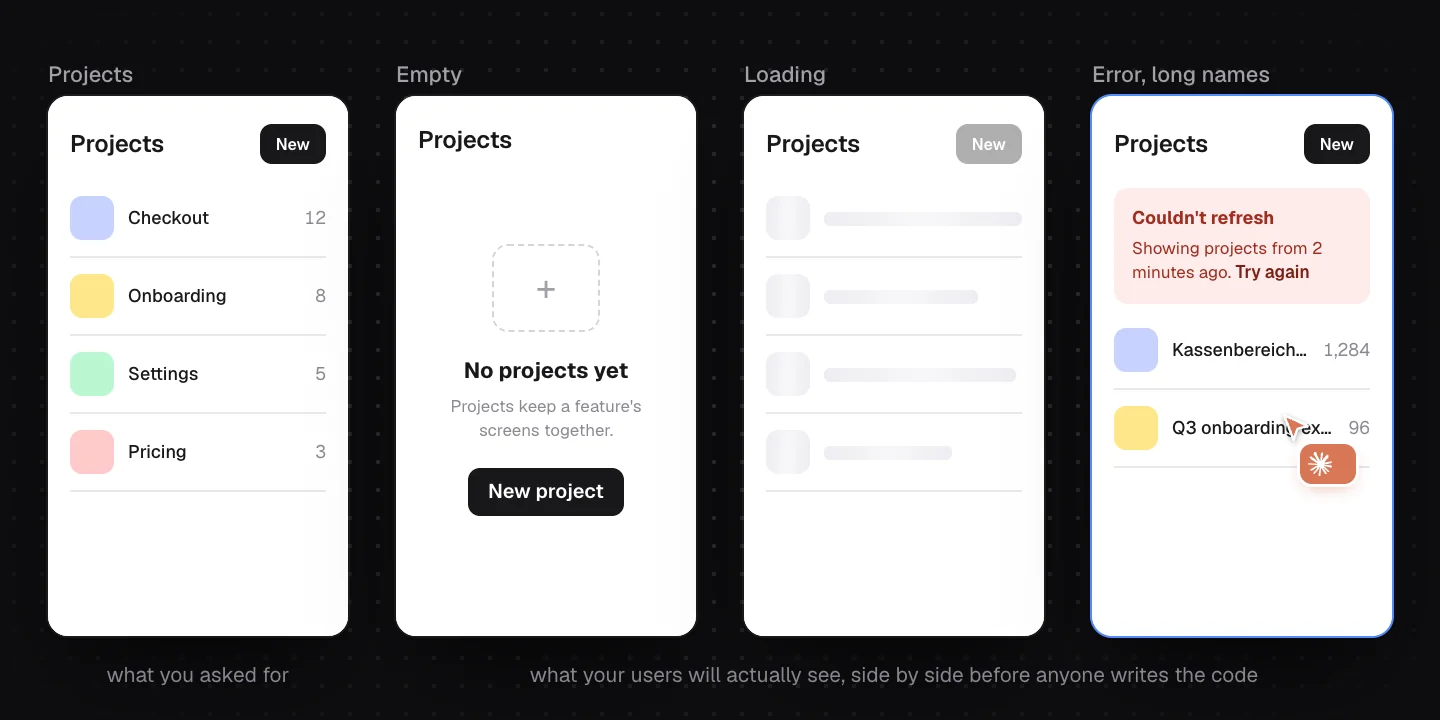
When the states sit next to each other you notice the error banner uses a different button style before it ships, not after a customer sends you a screenshot of it.
5. Review where the work is
Send the canvas link to whoever would review the design anyway: a designer, the PM, the person who owns the feature. They don't need Claude Code, a terminal or the repository. They click on the thing that's wrong and say so:
The total should be bigger, and Apple Pay first.
Then tell Claude Code to work through the comments. It reads the threads with get_comments, makes each change, replies and resolves the thread.
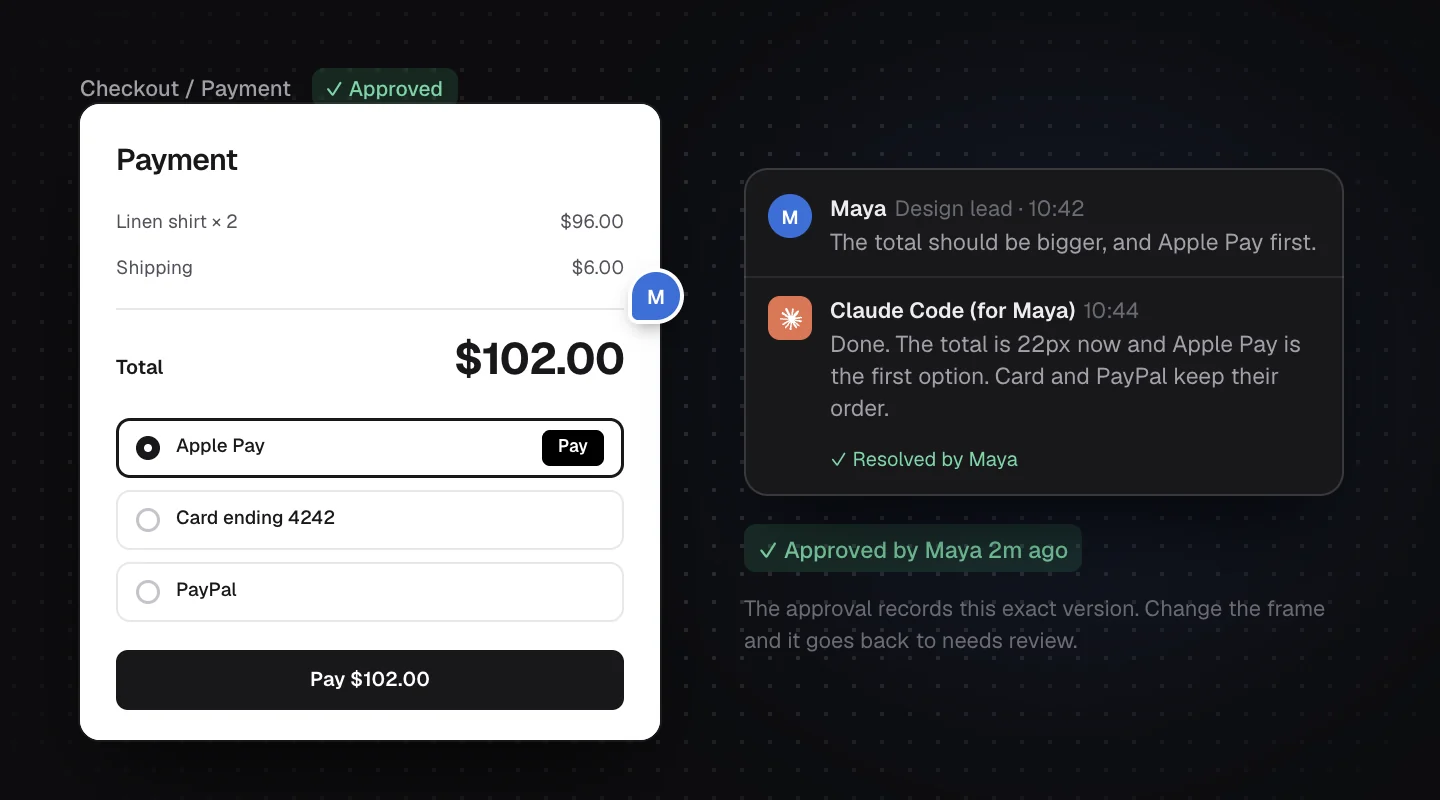
When a frame is right, approve it. The approval records the exact version that was signed off, and if anyone changes the frame afterwards it drops back to needs review. No more "which version did we agree on?"
6. Hand the approved design back to the repo
The frame is HTML, so the hand-off isn't a translation from vector shapes. Ask Claude Code to build what was approved, in your stack:
Build the approved frame "Checkout / Payment" in our Next.js app with our Button and Card components. Match its spacing and type.
It reads the frame with get_frame, maps the HTML onto your components and opens the change. The arguments about hierarchy, spacing, copy and states already happened on the canvas, with the people who care about them. The code review gets to be about code.
When to skip all this
Not every change deserves a canvas. For a padding tweak or a new table column, ask Claude Code to edit the code and check it in the browser. And if your design system and your designers live in Figma, keep them there: Figma's MCP server gives Claude Code your components and variables as context (how the two compare).
The canvas pays off when a screen is new, when several people have opinions about it, or when you want more than one direction before you choose.
Prompts to steal
- "Read DESIGN.md. Put our current settings page on the canvas, then design a cleaner version next to it and list what you changed."
- "Search real apps for onboarding flows that end with a paywall. Add the two best to the canvas, then design ours from them."
- "Design the empty, loading and error states for every frame on this page."
- "Read the comments on this page, make the changes and resolve each thread with a one-line reply."
- "Build the approved frames on this page in our codebase. Don't change anything that wasn't approved."
Start free and connect Claude Code to your first canvas. It works the same way with Cursor, Codex and other agents.