
The official MCP Registry is where a growing number of clients and directories look for servers. Glama copies from it, and so do others. Getting a remote server listed takes about ten minutes once you know the steps, and you don't need the mcp-publisher CLI at all: it's one key, one DNS record and two HTTP calls.
This is exactly what we ran to publish Floo as design.floo/floo, with the one thing that trips everyone up on a Mac.
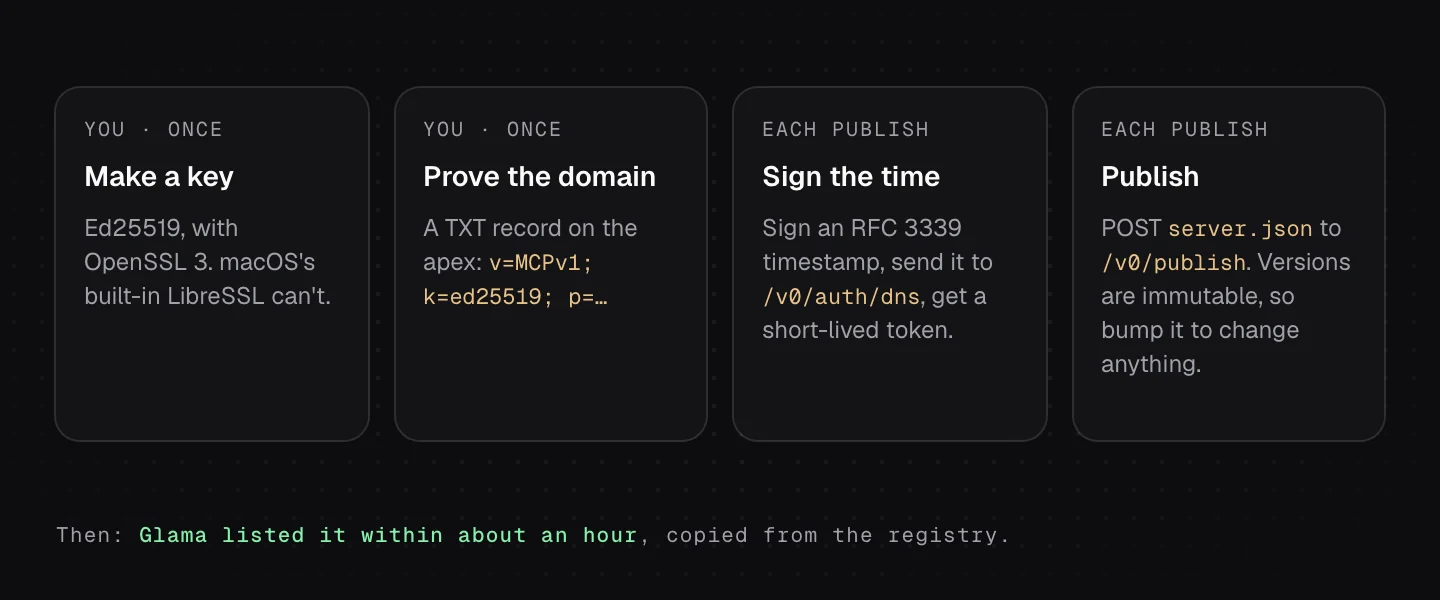
Why DNS auth for a remote server
The registry gives you a namespace based on how you prove who you are. Sign in with GitHub and your servers live under io.github.yourname/*. Prove a domain and they live under its reverse-DNS name: floo.design becomes design.floo/*.
For a hosted server that's the one you want. Your listing's name then matches the domain the endpoint runs on, so people can tell it's yours. (The registry doesn't check that your remote URL is on that domain, which is why the matching name matters to readers.)
1. Make an Ed25519 key, with OpenSSL 3
Here's the Mac gotcha: the openssl that ships with macOS is LibreSSL, and it can't generate Ed25519 keys. You'll get Algorithm Ed25519 not found. Install OpenSSL 3 with Homebrew and call it by its full path:
OPENSSL=/opt/homebrew/opt/openssl@3/bin/openssl   # Intel Macs: /usr/local/opt/openssl@3/bin/openssl

$OPENSSL genpkey -algorithm Ed25519 -out mcp-registry-key.pem
chmod 600 mcp-registry-key.pem

# the public key as the registry wants it: the raw 32 bytes, base64
$OPENSSL pkey -in mcp-registry-key.pem -pubout -outform DER | tail -c 32 | base64
Keep that key somewhere safe and out of your repo. You'll need it for every future publish.
2. Add one TXT record on the apex
Put the public key in a TXT record on the domain itself, not under a selector like _mcp:
example.com. IN TXT "v=MCPv1; k=ed25519; p=YOUR_BASE64_PUBLIC_KEY"
It can sit next to your SPF and site-verification records. Check it from the outside before moving on:
dig +short TXT example.com @1.1.1.1 | grep MCPv1
If you ever rotate the key, remove the old record. A stale one gets tried first and the signature check fails with an unhelpful error.
3. Write server.json
A remote server needs a name, a description, a version and a remotes entry. Ours, in full:
{
  "$schema": "https://static.modelcontextprotocol.io/schemas/2025-12-11/server.schema.json",
  "name": "design.floo/floo",
  "title": "Floo",
  "description": "Shared design canvas: your agent designs live HTML screens your team can see, comment on and edit.",
  "version": "1.0.0",
  "websiteUrl": "https://floo.design/mcp",
  "icons": [
    { "src": "https://floo.design/images/favicon/apple-touch-icon.png", "mimeType": "image/png", "sizes": ["180x180"] }
  ],
  "remotes": [
    { "type": "streamable-http", "url": "https://worker.floo.design/mcp" }
  ]
}
Two limits to know: description and title are capped at 100 characters by the schema (ours is 98), and the description is what directories copy word for word, so write it for a stranger. Use streamable-http; SSE is deprecated.
4. Sign a timestamp and trade it for a token
The registry proves you hold the key by asking you to sign the current time. Sign the exact RFC 3339 string, send it hex-encoded, and you get back a short-lived bearer token:
DOMAIN=example.com
TS=$(date -u +%Y-%m-%dT%H:%M:%SZ)
printf %s "$TS" > ts.txt
$OPENSSL pkeyutl -sign -rawin -inkey mcp-registry-key.pem -in ts.txt -out sig.bin
SIG=$(xxd -p sig.bin | tr -d '\n')

TOKEN=$(curl -s -X POST https://registry.modelcontextprotocol.io/v0/auth/dns \
  -H 'content-type: application/json' \
  -d "{\"domain\":\"$DOMAIN\",\"timestamp\":\"$TS\",\"signed_timestamp\":\"$SIG\"}" \
  | python3 -c 'import json,sys; print(json.load(sys.stdin)["registry_token"])')
-rawin matters: Ed25519 signs the message itself, not a digest, and without it OpenSSL 3 refuses. The signature should be exactly 64 bytes.
5. Publish, then check it's there
curl -s -X POST https://registry.modelcontextprotocol.io/v0/publish \
  -H "Authorization: Bearer $TOKEN" \
  -H 'content-type: application/json' \
  --data @server.json

curl -s 'https://registry.modelcontextprotocol.io/v0/servers?search=design.floo'
A 200 comes back with your listing and "status": "active". Versions are immutable: to change the description or the URL later, bump version and publish again with a fresh token.
What happened next
About an hour after we published, Glama had copied the listing on its own, and that listing is what the awesome-remote-mcp-servers list asks for before it'll take a pull request. So one publish turned into a second directory listing and an open pull request in about an hour, without filling in a form for either.
If your server speaks OAuth like ours does, check one more thing before you submit anywhere: an unauthenticated initialize should get a 401 with a WWW-Authenticate header pointing at your protected-resource metadata. That's what the awesome-remote list's automated check accepted from us. A 500 or a timeout reads as broken.
Try the server we listed
Floo is a shared design canvas: your coding agent designs real HTML screens on it, and your team watches, comments and approves in the browser. It's at https://worker.floo.design/mcp, and connecting an agent takes a minute.